
Selected work / Timber construction brand
Timber construction brand · Client portal + automation
A client portal that always knows which ads are running.
The problem
The agency managing the brand’s Meta campaigns had no single place to show the client what was running. Creative review happened over email, checking live copy meant digging through Ads Manager, and nothing was archived. Every week, the same questions: what’s live, what’s waiting on approval, what did we already test?
What we built
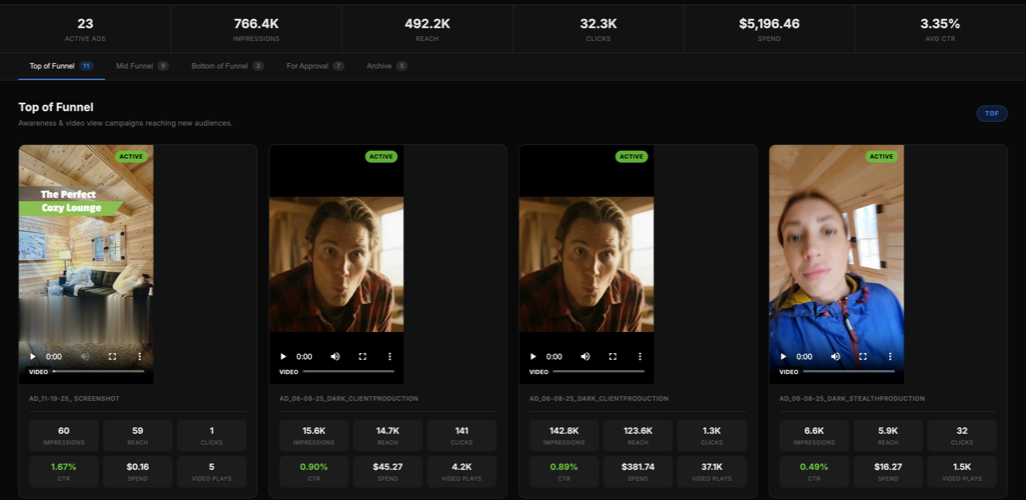
A purpose-built portal behind a secure client link, refreshed automatically every morning. It pulls live campaign data from the Meta API, matches each ad to its original source creative, surfaces every copy variation deduplicated by funnel stage, and moves new files into an approval queue and retired ones into an archive, all on its own.
Before: 2-3 hours a week, by hand
- Walk Ads Manager campaign by campaign
- Screenshot active creatives
- Open each ad to read its copy
- Same text noted multiple times
- Export files, email the client
- Track approvals in threads
- No archive
- Retired creatives just got lost
After: about 5 minutes a week
- Drop a new creative in the shared folder
- Nothing else to do
- Open the dashboard link
- All creatives by funnel stage
- Copy variations surfaced
- New files appear overnight
- Client reviews at their private link
- Retired creatives file themselves
- Searchable history, zero clutter
How it was built
The work, step by step.
- Meta API
- Custom web app
- Claude Code
- Automated deploys
- 01
Built the data pipeline
Nightly pull of live campaign and ad data from the Meta API: creatives, copy, and 30-day performance metrics.
- 02
Solved creative matching
Each ad displays its actual source file, not a low-res platform thumbnail, matched automatically from the agency’s asset storage.
- 03
Untangled the copy structure
Meta stores copy differently per campaign type. Parsing logic handles both standard and dynamic formats and deduplicates the result.
- 04
Automated approvals + archive
Files added to a folder appear on the dashboard overnight; retired creatives move to a reference archive on their own.
- 05
Made it self-maintaining
The whole pipeline runs on a schedule. If the ad account changes, the dashboard reflects it the next morning.
In the wild
Have a workflow like this? Let's look at it.
A free, 20-minute readiness call. We'll tell you honestly whether it's a two-week build or a bigger one.